# Roomcraft Dungeons and interiors from your own modular kit. Set a seed, a number of rooms and floors, and Roomcraft lays out rooms, corridors and stairs, places your floor, wall, ceiling and doorway meshes, dresses the rooms with your props, and sets up a run: a start room, a boss room behind locked doors, a key to open them, treasure in the dead ends. Or bring your own room actors or room levels and Roomcraft joins them door to door. It builds in the editor and at runtime, the same on the server and every client from the seed alone, with a runtime navmesh and no actor to place by hand. C++ throughout, open to Blueprint. Measured on 200 rooms over 3 floors (96 x 96 cells) with the KayKit theme: 19,850 instances, 2,294 of them props, and 2,643 point lights. Other editors were running on the same machine, so read the times as a ceiling: | Case | Result | |---|---| | Layout (rooms, corridors, stairs, mission) | 6 to 7 ms | | In a game, the frame that starts the build | 37 ms | | In a game, the rest, spread over frames | about 90 frames, worst frame 14 ms | | In the editor, all at once | about 0.7 s | | Server and client | same layout, checked by hash, listen and dedicated server | | Rooms a navmesh path reaches from the start room | 200 of 200, on all 3 floors | | Baked into a World Partition map | 108 blocks; the client loads the 84 near the player | | GPU per frame at 1080p, RTX 2070 SUPER (machine idle, two runs) | 5.0 to 5.2 ms inside a room, 4.9 to 5.0 ms in a corridor, 6.8 to 6.9 ms seeing the whole dungeon from above | 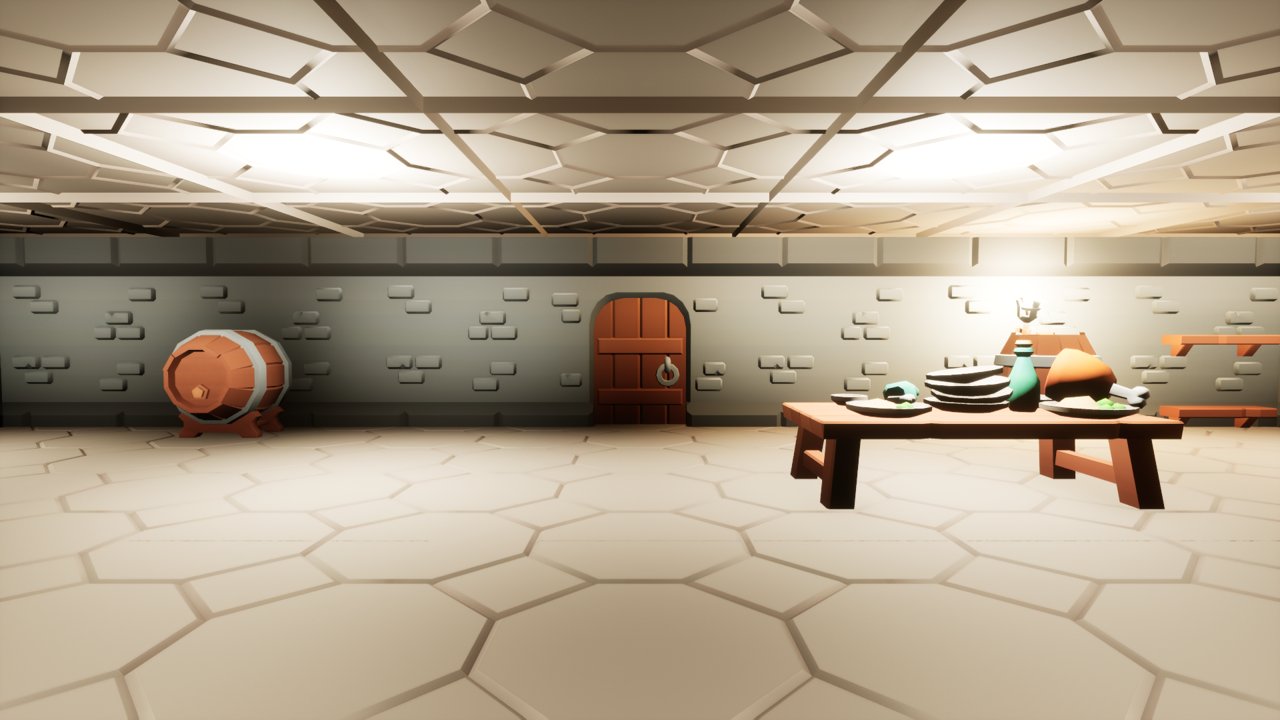 ## Contents - [Requirements](#requirements) - [A dungeon from scratch in 10 minutes](#a-dungeon-from-scratch-in-10-minutes) - [Layout settings](#layout-settings) - [Themes: your kit](#themes-your-kit) - [Props](#props) - [Mission, doors and key](#mission-doors-and-key) - [Spawn rules](#spawn-rules) - [Your own rooms](#your-own-rooms) - [Growing as players walk](#growing-as-players-walk) - [Multiplayer](#multiplayer) - [Navigation](#navigation) - [Minimap](#minimap) - [Big dungeons and World Partition](#big-dungeons-and-world-partition) - [Blueprint](#blueprint) - [Demo content](#demo-content) - [When something looks wrong](#when-something-looks-wrong) - [Limits](#limits) ## Requirements Unreal Engine 5.6, 5.7 and 5.8. Tested on Windows (editor, packaged game, listen and dedicated server); it also compiles for Linux. No other plugin needed. ## A dungeon from scratch in 10 minutes 1. **Enable the plugin** and restart the editor. To see it working first, open `/Roomcraft/Demo/Maps/L_RoomcraftExample` and press Play. 2. **Navigation, once per project.** In Project Settings > Navigation Mesh, set **Runtime Generation** to **Dynamic**. For more than about 300 rooms, also raise **Default Max Search Nodes** (32768 covers 300 rooms; the dungeon writes a warning in the log when yours is too low). 3. **Place a dungeon.** Place Actors, search "Roomcraft Dungeon", drag it into the level. A grey box dungeon appears: 60 rooms on 3 floors. The grey box has a closed ceiling and no lights, so in a game it is dark inside: light it with your kit's lights (step 8 and Ceiling Light below). 4. **Shape it.** In the Details panel, under **Layout**, change **Seed** for another dungeon, **Floor Count**, **Room Count**, **Grid Size** (cells per floor), room sizes. The dungeon rebuilds after each change, and Undo brings the last one back. With **Preview In Editor** off it only rebuilds when you press **Generate**.  5. **Your kit.** In the Content Browser, Add > Miscellaneous > Data Asset > **Roomcraft Theme**. Open it and set **Floor**, **Wall**, **Ceiling**, **Ramp** and **Doorway** to your meshes. Any pivot and any size work: each piece is fitted to its slot by its bounds. 6. **Match the grid to the kit.** In the theme, press **Match Grid To Kit**: cell size and floor thickness come from the floor mesh, wall thickness from the wall, and floor height is the wall standing on a floor tile. Then press **Check Kit**: the log lists every piece that gets stretched (a ramp may stretch up to 2.5 times along its run: the steps just get longer), and every material or mesh that will not work in game (missing collision, or not set to be used with instanced meshes). Fix what it lists. 7. **Use it.** On the dungeon, set **Theme** to your theme. After editing the theme itself, press **Generate** on the dungeon: it does not watch the theme asset. 8. **Props.** In the theme, add entries to **Props**: a mesh, where it goes (against a wall, in a corner, in the middle, on a wall), a chance and a limit per room. Doorways, stairs and a path through every room stay clear on their own. 9. **Play.** With the default game mode, players spawn in the start room (remove any Player Start already in the level, or the game mode may pick it). Doors open when a pawn walks into them, the key in the key room unlocks the boss room for everyone. In multiplayer nothing else is needed: only the settings replicate, each machine builds the same dungeon. From here, every section below goes deeper on one step. ## Layout settings | Setting | What it does | |---|---| | Seed | Same seed, same dungeon, on any machine. | | Floor Count | Floors, joined by ramps or stairs two cells long. | | Grid Size | Cells per floor in X and Y. A cell is the theme's Cell Size wide. | | Room Count | Rooms over all floors. Fewer are placed when the grid runs out of space; the log says how many fit. | | Room Size Min / Max | Room size in cells. | | Stairs Per Floor | Ramps between each floor and the one above. | | Loop Chance | Chance of a second way between rooms that are already connected. 0 gives a tree with dead ends only. | | Place Mission | Picks start, boss, key and treasure rooms. See [Mission](#mission-doors-and-key). | | Door Chance | Share of doorways that get a door that opens. The rest stay open arches. | Every room is always reachable: corridors are laid as a minimum spanning tree over the rooms and stairs of each floor, then Loop Chance adds second routes. ## Themes: your kit  A **Roomcraft Theme** is your modular kit and the grid it was made for. | Piece | Where it goes | |---|---| | Floor | One per walkable cell. | | Wall | One per closed cell edge. Walls made along Y are turned to run along the edge by themselves. | | Ceiling | One per cell with nothing above it, in the slab the floor above would take. Leave empty for a kit seen from above. | | Ramp | Two cells long. **Tilt Ramp** on: a flat slab, tilted. Off: a staircase that already climbs; **Smooth Stair Collision** then puts an invisible slope under it, so feet and the navmesh climb it whatever the steps are like. | | Doorway | The frame on every opening between a room and a corridor. Leave empty for plain openings. | | Ceiling Light | A fitting under the ceiling every **Ceiling Light Spacing** cells. **Ceiling Light Lumens** above 0 adds a real point light under each one; a light with no fitting mesh works too, as a fill light. | | Door Leaf | The moving part of the doors, fitted to **Door Opening Size**. | Each piece can carry a **Material** that replaces the mesh's own, and **Quarter Turns** for a mesh made facing another way. **Stretch To Fit** off keeps the mesh's size and only centres it. **Light Draw Distance** (40 m by default) skips ceiling and prop lights farther than that from the camera, fading them out before it. A big dungeon has thousands of lights and its walls hide nearly all of them. Walls stand from the floor up to the underside of the floor above: **Floor Height** minus **Floor Thickness**. A floor tile made for a camera from above often has no underside, so from the floor below the rooms above seem to float. Give the Floor piece a two-sided material (a material instance with Two Sided ticked is enough); the KayKit theme does this, and uses the same tile as its ceiling. ## Props Each entry of **Props** in the theme places one mesh by a rule: | Setting | What it does | |---|---| | Placement | **Against Wall**: back to a wall. **Corner**: back and side to walls. **Center**: in the middle of the room. **On Wall**: hung at Mount Height, like a torch. | | Chance, Max Per Room | Chance on each free spot, and the most of it in one room. | | Only In Roles | Only in rooms with these roles: a chest only in treasure rooms, rubble only in the boss room. | | In Corridors | Also along corridor walls (Against Wall and On Wall). | | Mount Height | Height of an On Wall prop above the floor. | | Scale Range, Random Yaw | Size picked between the two values; a Center prop turned to any angle instead of quarter turns. | | Light Lumens | A point light at the prop, for torches and lamps, with **Light Radius**, **Light Color** and **Light Offset** from the prop's middle. | | Quarter Turns | Turns the mesh so its front faces +X. | What stays clear, always: doorways and the cell in front of them, the ends of every staircase, the middle cell of every room (where the key, the player starts and the room actors spawn) and the cells around the start room's middle. A floor prop is only placed if the room's doorways and middle stay linked through free cells. Props come from their own random stream, so changing them never changes the layout. ## Mission, doors and key 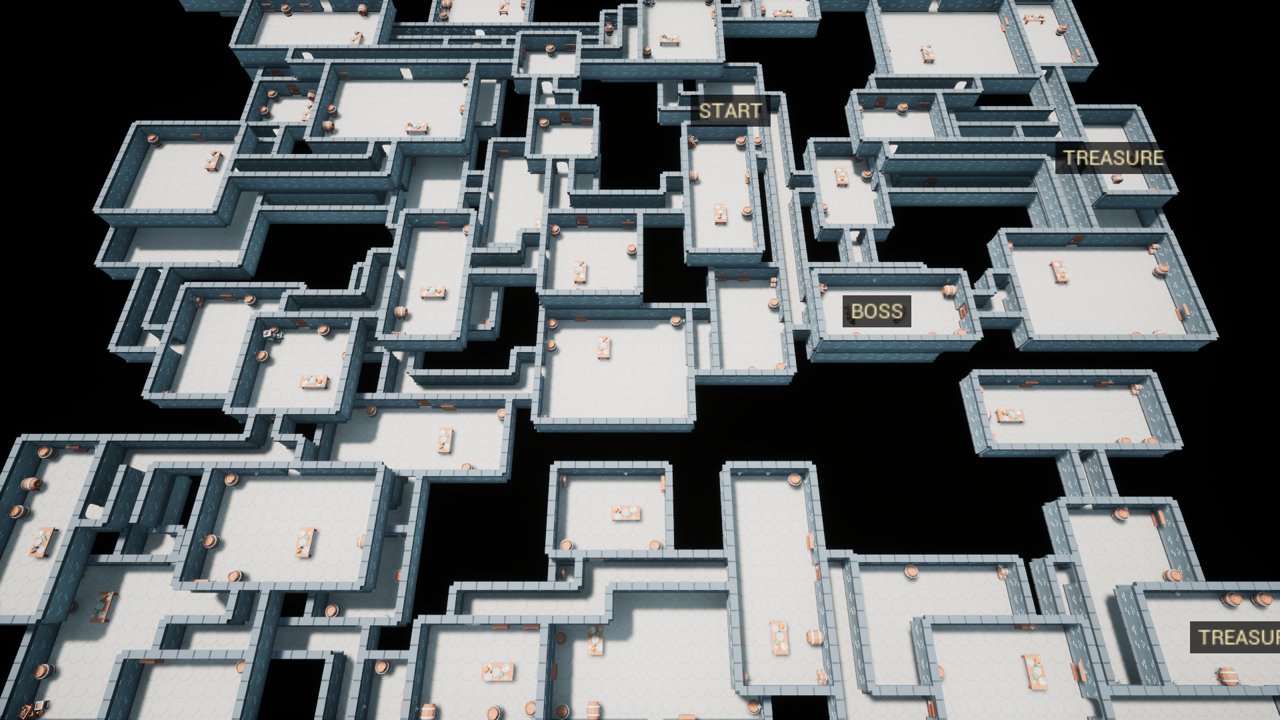 With **Place Mission** on, the dungeon picks: - a **start** room on the ground floor; - a **boss** room, the farthest from the start, with every way in locked (**Lock Boss Room**); - a **key** room, the farthest one reachable while the boss is locked; - **treasure** rooms (**Treasure Room Count**), dead ends first. In a game the server spawns the doors (**Door Class**, a **Roomcraft Door** by default), the key (**Key Class**), **Player Start Count** player starts in the start room, and optional **Boss Room Actor Class** and **Treasure Room Actor Class** in the middle of those rooms. Doors open when a pawn walks into them; turn **Open On Touch** off and call **Open** from your own interaction instead. The key unlocks the boss doors for the whole team. Subclass the door and the key in Blueprint for sounds, messages or an inventory key: they have events for touched while locked, lock changed, open changed and collected. ## Spawn rules  **Spawn Rules** on the dungeon put your actors in the rooms without a line of code: enemies, loot, traps. Each rule has: | Field | What it does | |---|---| | Actor Class | What to spawn. The server spawns it, so make it replicate if clients must see it. | | Room Roles | Which rooms: Normal, Start, Boss, Treasure, Key, any mix. | | Min Depth, Max Depth | Only rooms between these depths. 0 is the start room, 1 the farthest. | | Count At Start, Count At Deepest | How many per room. The count grows with the room's depth; 1.5 means one, and a second half the time. | | Max Count | Most this rule spawns in the whole dungeon. 0 has no limit. | | Wall Margin | Spawn points keep this far from the walls (150 cm). | | Height Above Floor | 100 cm suits a character, which spawns at the middle of its capsule. | Points come from the seed, a stream per rule and room, so adding a rule leaves the others where they were. An actor that lands on a prop is moved off it. **On Rule Actor Spawned** fires on the server after each one, with its room and rule, to set its level or loot by **Get Room Depth**. **Plan Rule Spawns** returns the points without spawning anything, for a preview or your own spawner. On a 200-room grid with a rule of 0 to 4 enemies in normal rooms, the deep rooms get 3.1 on average and the rooms near the start 0.7. ## Your own rooms  Set **Generator** to **Rooms** to join your own room actors instead of building from a kit. 1. Make an actor per room (Blueprint or C++). Add a **Roomcraft Room Bounds** that hugs the walls; its bottom is the floor. Add a **Roomcraft Door Marker** on the floor in the middle of each doorway, arrow pointing out of the room. 2. Make a **Roomcraft Room Set** (Data Asset) and list your rooms. Per room: **Weight**, **Max Count**, and **Use** (Any, Start Only, Boss Only). Press **Check Rooms**: it lists the doorways and size it read from each room, or why a room cannot be used. 3. On the dungeon set **Snap Rooms** to your set. **A room can also be a level.** Leave **Room Class** empty and set **Room Level** to a plain level (not World Partition). Put a Room Bounds and the Door Markers on any actor in it, an empty actor works, and build the room around them with whatever the level can hold: meshes, lights, decals, foliage. Check Rooms reads the markers where they stand in the level. In a game each machine loads the level as a level instance, and the dungeon waits for it to load before spawning the key and the players. In the editor it shows as a Level Instance actor, never saved with your map. The generator grows from open doorways, turns each new room by quarter turns so the doorways face, refuses any overlap, and joins doorways that land on each other (that makes loops). A Boss Only room is joined last, at the doorway farthest from the start. **Door Cap Class** closes the doorways nobody joined. Rooms spawn on every machine without replication; gameplay inside a room that must replicate belongs in its own actor. ## Growing as players walk  With the Rooms generator, turn on **Grow As Players Walk** for a dungeon with no end, like a roguelike floor or the Backrooms. The dungeon starts with **Room Count** rooms and closes every free doorway with a door. When a player comes within **Grow Distance** (12 m) of one, the server adds a room behind it, picked and turned like any other, so the room is there before the door opens. Where nothing fits, the door goes and a **Door Cap** takes its place. - **Max Grown Rooms** (300) stops the growth; past it the edge doors close for good. 0 has no limit. - **Grow Extent** (300 m each way) is the box the dungeon may grow into. The navmesh bounds and the minimap cover all of it from the start. - **Grow Full Depth Rooms** (20): a growing dungeon has no farthest room, so depth reaches 1 this many rooms from the start. Spawn rules fill each new room with it. - **Unload Far Rooms** (on): only rooms within **Keep Rooms Within Doors** (4) of a player stay loaded. Farther rooms are hidden with no collision, or streamed out when they are room levels, and come back as a player nears them. Each machine does it for the players it knows; on the server, actors the spawn rules put in a far room wait hidden and frozen. In the network test, after 125 rooms the server kept 20 loaded and the client 10. - **On Room Grown** fires on the server and every client after a room was added. **Grow At Doorway Near** grows on demand, from a trigger or a map item. **Get Edge Doorways** says where the next rooms will come. Only the order of the doorways travels: the server records each step and clients replay it, so a player who joins late builds every room grown so far. In the network test, 25 seconds of walking added the same rooms on the server and the client, with the same hash. ## Multiplayer Only the settings travel: Generator, Snap Rooms, Layout Settings, Theme, Place Props and Grow As Players Walk. The server and each client build the same dungeon from them, and the network test compares a hash of the layout on both. Doors, the key and the player starts are spawned by the server and replicate like any actor. To start a new dungeon in a running game, call **Generate With Seed** on the server; clients follow. ## Navigation  With **Build Navigation** on, the server fits a navmesh bounds volume to the dungeon once its meshes are built, so the level needs none. It needs **Runtime Generation** set to **Dynamic**; the log says so when it is not. Doors and the key stay out of the navmesh, so AI walks up to a door and it opens. A locked door is the exception: its doorway is cut from the navmesh until the key opens it, so AI never paths into the boss room early. **Has Navigation Path** tells whether one room reaches another. ## Minimap 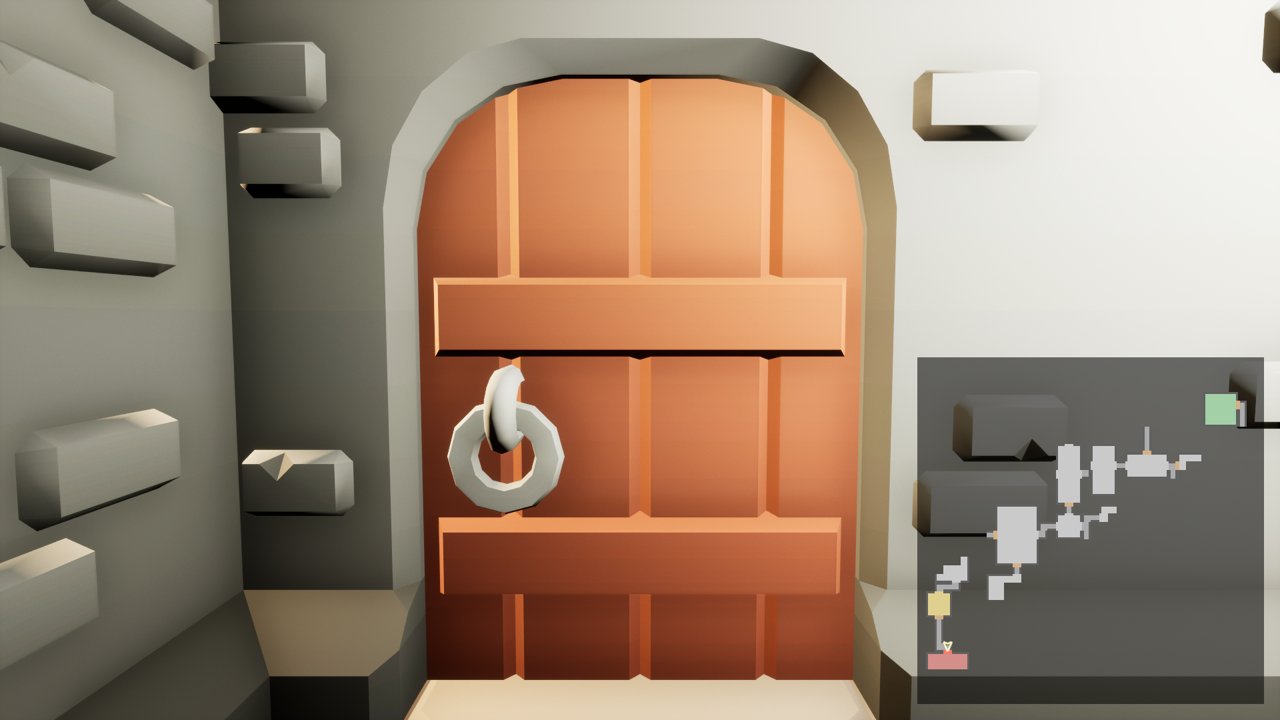 **Roomcraft Minimap** is a widget for your HUD. It draws the floor the player is on from the layout: rooms coloured by role, corridors, stairs, walls, doors, and locked doors in red until the key opens them. The player is an arrow, other players are dots. Create it with **Create Widget**, add it to the viewport and give it a size, or put it in your own widget inside a Size Box. - **View Size** is how much of the world shows around the player (60 m). **Show Whole Map** shows the floor instead. - Add a **Roomcraft Minimap Explorer** to the player controller (or the pawn) and only what the player has seen shows: the whole room they walk into, and the corridors around them. The server keeps it and sends it to that player only. The explorer's **Reveal All** shows everything, like a map item picked up. The widget's own **Reveal All** ignores the explorer. - Each machine draws its own map from the seed; nothing about the map itself is sent. - **Make Minimap Texture** returns a texture of one floor for a pause-menu map, and **World To Minimap** turns a world position into a point on it, for your own markers. The Rooms generator draws every room on one floor of the map. ## Big dungeons and World Partition 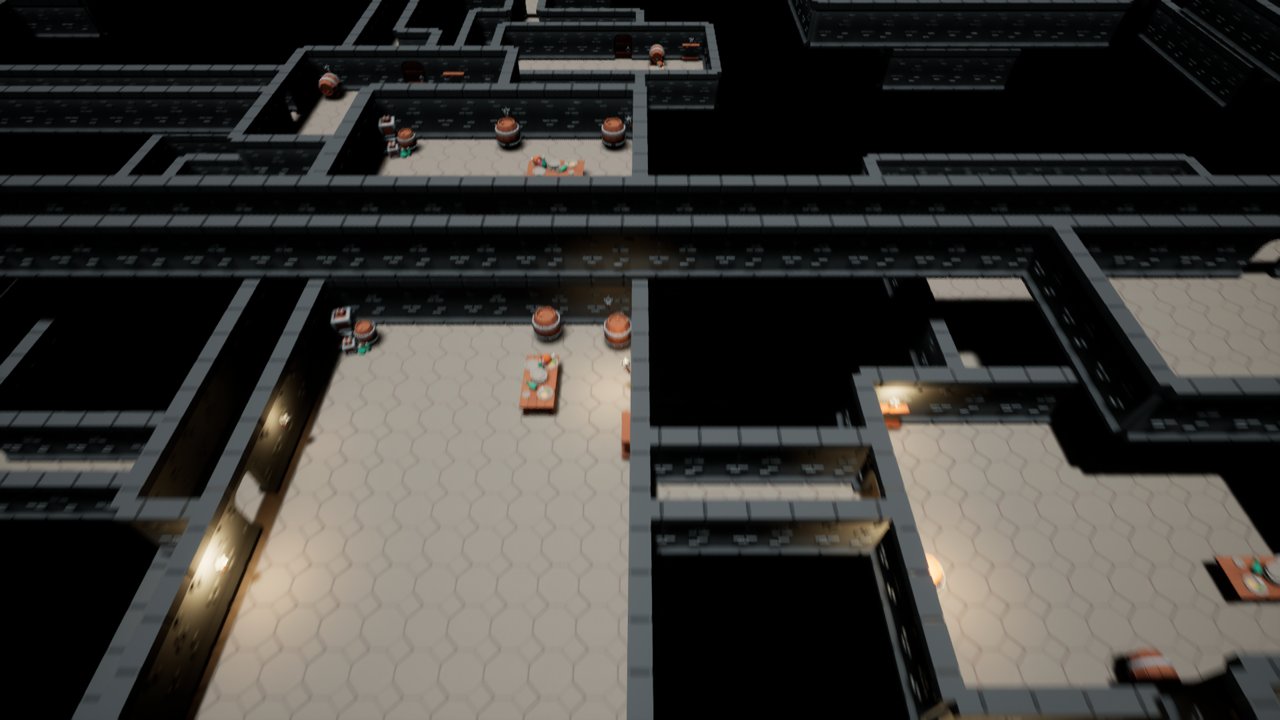 - **Blocks.** Floors, walls, ceilings, doorways, fittings, props and their lights are grouped in blocks of **Chunk Size** cells (16) per floor, so whole blocks are skipped when off screen. **Cull Distance** stops drawing them past a distance. - **Over frames.** In a game, **Build Over Frames** builds a few blocks per frame within **Build Budget Milliseconds**, the start room's block first, props and lights with their block. **On Dungeon Built** fires when the last block is in. With the LogRoomcraft log on Verbose, each build writes how long its stages took. - **Bake To Level.** In the editor, press **Bake To Level** to write each block into the level as its own actor, with its props, stairs and lights. In a World Partition map each block streams with its cell; the dungeon itself stays loaded and still builds the mission, doors, key and navmesh. **Clear Baked** goes back to building at runtime. Each is one Undo step. Change the settings after a bake and the log warns that the baked meshes are out of date. ## Blueprint 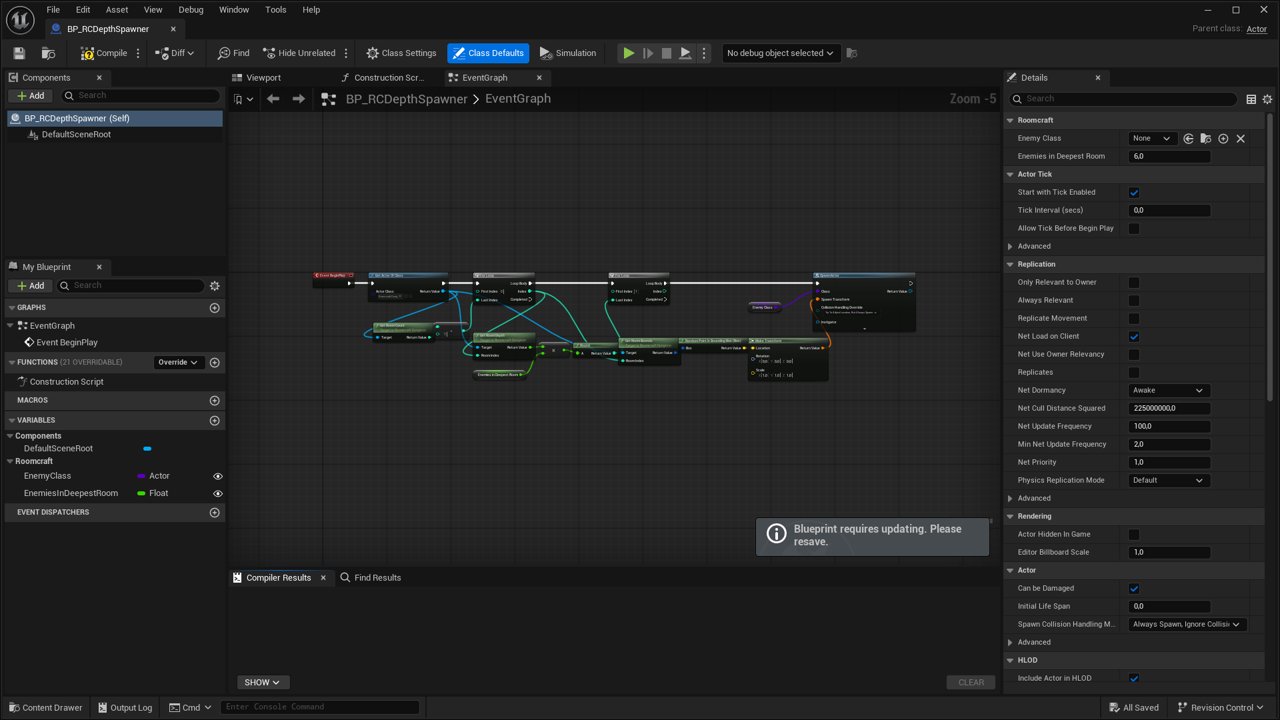 Everything on the dungeon is open to Blueprint: **Generate**, **Generate With Seed**, **Set Theme**, **Unlock Locked Doors**, and the queries **Get Room Count**, **Get Room Center Location**, **Get Room Role**, **Get Rooms With Role**, **Get Start Room**, **Get Boss Room**, **Get Key Room**, **Get Door Count**, **Is Mission Solvable**, **Are All Rooms Reachable**, **Has Navigation Path**, **Is Built**, **Plan Rule Spawns**, **Grow At Doorway Near**, **Make Minimap Texture**, **World To Minimap**, plus the events **On Dungeon Built**, **On Locked Doors Unlocked**, **On Rule Actor Spawned** and **On Room Grown**. For spawning and reacting to rooms: | Node | Returns | |---|---| | Get Room Bounds | The room's world box, floor to ceiling. Pick spawn points inside it. | | Find Room At Location | The room a position is in, or -1 in a corridor or on a stair. Call it with the player's location to know when they walk into the boss room. | | Get Room Depth | 0 at the start room, 1 at the farthest one, -1 with the mission off. Multiply enemy count or loot by it. | | Get Doors, Get Key | The door actors and the key this dungeon spawned. A client only has the ones near its player. | ## Demo content **Open `/Roomcraft/Demo/Maps/L_RoomcraftExample` and press Play** to try it: a KayKit dungeon of 40 rooms on 2 floors, a first person character, and the minimap filling in as you walk. WASD walk, mouse look, Space jump, F fly through walls, R new dungeon, M whole map. The map uses the **Roomcraft Example Game Mode**, **Character** and **HUD**: plain C++ classes to read and replace, not needed by the dungeon. `Content/Demo` holds two themes: **KayKit Dungeon Remastered** by Kay Lousberg (CC0) with its props, and a Backrooms theme made for Roomcraft. The plugin does not need them; see ThirdPartyNotices.txt. ## When something looks wrong | What you see | Why, and what to do | |---|---| | The dungeon is black in a game | Nothing lights the inside. Set **Ceiling Light Lumens** in the theme, give props a light, or place your own lights. | | From below, the rooms above float in the air | Your floor tile has no underside. Give the Floor piece a two-sided material. | | AI does not move, or the log warns about the navmesh | Set **Runtime Generation** to **Dynamic** in Project Settings > Navigation Mesh. | | AI stops halfway in a big dungeon | The path search ran out of nodes: raise **Default Max Search Nodes** (the log says when). | | A change in the theme does not show | The dungeon does not watch the theme asset: press **Generate**. | | A piece looks squashed or leaves gaps | Press **Check Kit** in the theme, then **Match Grid To Kit**. | | A room never shows up in the Rooms generator | Press **Check Rooms** in the room set: it says what is missing (Room Bounds, a Door Marker, or a World Partition level). | ## Limits - Props come from the grid generator. Rooms from the Rooms generator are your actors: dress them as you like. - A Blueprint child room that moves an inherited Door Marker is read with the parent's position. - Room actors and room levels are local to each machine. Gameplay inside a room that must replicate belongs in its own actor, spawned by the server. - In a growing dungeon the layout keeps every room it grew, so memory grows with it even with far rooms unloaded (under 1 KB of layout per room). With room levels, each new room waits for its level to load, which can take a frame or two. - The minimap of the Rooms generator has one floor. ## Support Write to contato@tessaroapps.com with your engine version and, if you can, the log lines that start with `LogRoomcraft`. We answer within 2 business days.